API
HTTP API for background removal, HD downloads, and AI backgrounds. Same credits and 24 h retention as the website.
Getting started
- Create an API key (sign in required). Copy the secret once.
- Send it as
Authorization: Bearer <key>orX-Api-Key: <key>. - Upload → poll → download preview (free) or full (credits). Or use sync
/api/v1/removebg.
Upload and poll
curl -sS -X POST https://api.bgready.com/api/v1/jobs \
  -H "Authorization: Bearer $BGR_API_KEY" \
  -F "image_file=@photo.jpg" \
  -F "mode=auto"
# mode: auto (default) | product | portrait — accepted and stored. Default
# sprited/birefnet currently maps all modes to variant=general (selector hidden).

# → 202 {"id":"…","status":"pending","mode":"auto","status_url":"…/jobs/…",…}

curl -sS -H "Authorization: Bearer $BGR_API_KEY" \
  https://api.bgready.com/api/v1/jobs/$JOB_ID
Download preview / full
# Preview is free
curl -sS -H "Authorization: Bearer $BGR_API_KEY" \
  "https://api.bgready.com/api/v1/jobs/$JOB_ID/result?size=preview&format=png" \
  -o preview.png

# Full resolution unlocks HD once (1 credit)
curl -sS -H "Authorization: Bearer $BGR_API_KEY" \
  "https://api.bgready.com/api/v1/jobs/$JOB_ID/result?size=full&format=png&bg_color=ffffff" \
  -o full.png
Render options (product images for plugins)
Same look as the web editor’s Product preset — background, canvas, fit-to-subject, shadow — rendered server-side.
Use query params on GET /api/v1/jobs/{id}/result, JSON/form on POST /api/v1/jobs/{id}/render
(multipart bg_image when bg=image), or the same params on the batch ZIP.
| Option | Values | Default |
|---|---|---|
bg | transparent | color | image | transparent |
bg_color | 6-digit hex (ffffff / #ffffff) | — |
canvas | original | square | aspect W:H (e.g. 4:5, 16:9) | original |
fit | subject (trim to alpha) | none | none |
margin | 0–30 (% of canvas; with fit=subject) | 8 |
size | preview | full | long side px 64–4000 | preview |
shadow | none | soft | none |
shadow_strength | 0–100 | 40 |
format | png | jpg | webp (jpg forces a non-transparent bg) | png |
quality | 1–100 (jpg/webp) | 95 / 90 |
watermark | none | default | preset UUID | none |
watermark_text / watermark_font / watermark_color | Inline text mark (font: jakarta_regular | jakarta_bold | baskerville) | — |
watermark_image_file / watermark_image_url | Multipart file or SSRF-safe URL (≤ 2 MB, ≤ 2000 px; no SVG) | — |
watermark_opacity / scale / position / margin / rotation | 5–100 / 3–60 / tl…br 9-grid / 0–20 / −45…45 | 60 / 18 / br / 3 / 0 |
watermark_tile + tile_spacing / tile_angle | bool + 10–200 % / −45…45 | off |
Watermark is free (no credit cost). Inline fields override a selected preset. Preset CRUD:
GET/POST /api/v1/watermarks, GET/PATCH/DELETE /api/v1/watermarks/{id}.
Compat /v1.0/removebg accepts the same watermark* params but defaults to none
(never applies the account default implicitly).
Credits: size=preview is free; size=full or any px larger than the preview’s long side unlocks HD once
(key hd:<job id>, 402 if short). Never upscales beyond the source. Invalid options → 400 invalid_option.
# White square 2000 px for marketplaces (charges HD when 2000 > preview)
curl -sS -H "Authorization: Bearer $BGR_API_KEY" \
  "https://api.bgready.com/api/v1/jobs/$JOB_ID/result?size=2000&bg=color&bg_color=ffffff&canvas=square&fit=subject&margin=8&shadow=soft&format=jpg" \
  -o product.jpg

# Transparent fit-to-subject 1000 px
curl -sS -H "Authorization: Bearer $BGR_API_KEY" \
  "https://api.bgready.com/api/v1/jobs/$JOB_ID/result?size=1000&bg=transparent&canvas=original&fit=subject&margin=8&format=png" \
  -o cutout.png

# Custom background image (POST /render)
curl -sS -X POST -H "Authorization: Bearer $BGR_API_KEY" \
  -F "bg=image" -F "bg_image=@studio.jpg" \
  -F "canvas=square" -F "fit=subject" -F "margin=8" \
  -F "size=preview" -F "format=jpg" \
  "https://api.bgready.com/api/v1/jobs/$JOB_ID/render" \
  -o custom.jpg
Synchronous removebg
curl -sS -X POST "https://api.bgready.com/api/v1/removebg?size=preview&format=png" \
  -H "Authorization: Bearer $BGR_API_KEY" \
  -F "image_file=@photo.jpg" \
  -F "mode=product" \
  -o out.png
# Waits up to 30.0s; on timeout returns 202 with the job for polling.
From the editor to the API
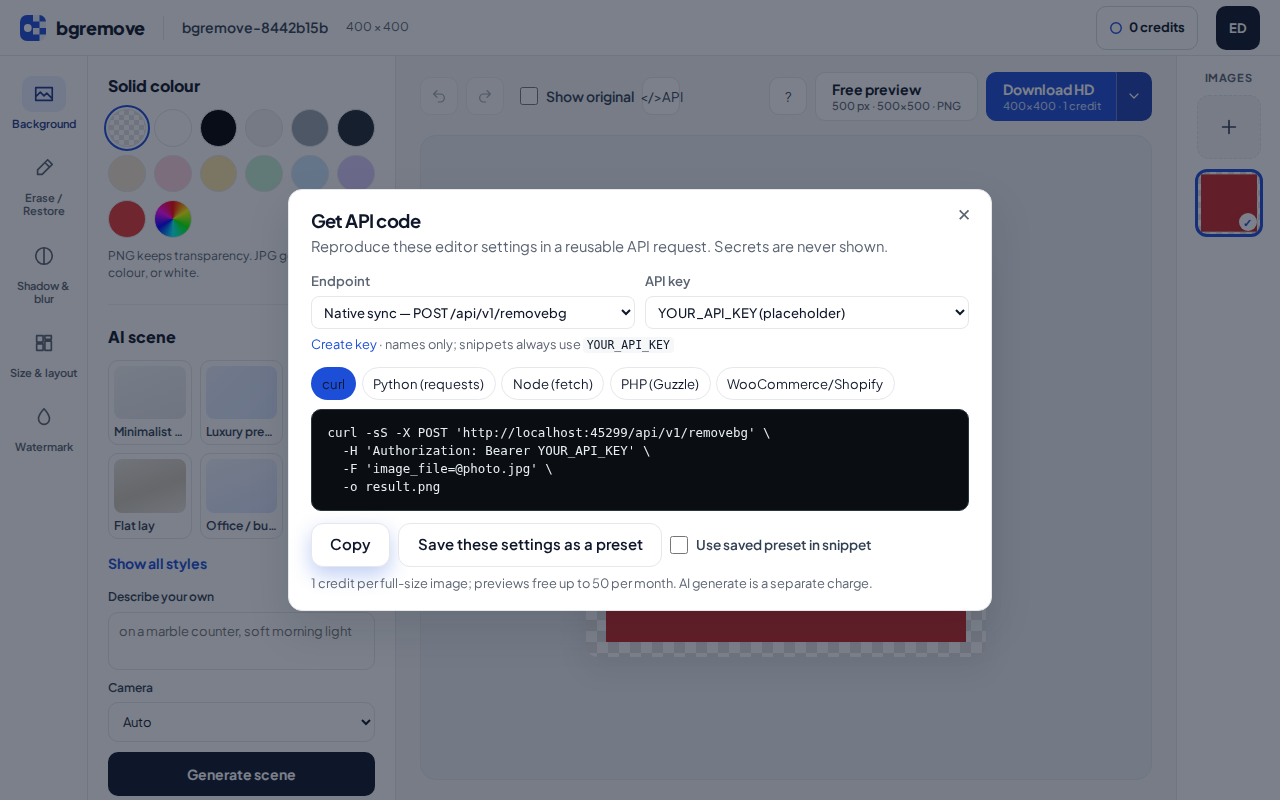
In the web editor, click </> API next to Show original. The modal builds a request that
matches your current background, canvas, centre/margin, shadow, watermark, format and size — for
curl, Python (requests), Node (fetch), PHP (Guzzle), or a short
WooCommerce/Shopify settings list. Endpoint switch: sync POST /api/v1/removebg (default),
async jobs + render, and when migration is public the compat /v1.0/removebg.
Save these settings as a preset stores a RenderPreset
(GET/POST/PATCH/DELETE /api/v1/presets). Snippets can then use preset=<id>
on removebg / result / render; explicit query or body params override the preset. Presets appear under
Account → Presets and as a “bgremove preset” dropdown in the WooCommerce and Shopify plugins.
API keys in the modal are listed by name only; snippets always use the placeholder
YOUR_API_KEY — never a real secret. Credits: 1 credit
per full-size image; previews free up to 50/month.
Batches
curl -sS -X POST https://api.bgready.com/api/v1/batches \
  -H "Authorization: Bearer $BGR_API_KEY" \
  -F "image_file=@a.jpg" -F "image_file=@b.jpg" \
  -F "mode=portrait"

# → 202 {"id":"…","jobs":[…],"status_url":"…/batches/…"}

curl -sS -H "Authorization: Bearer $BGR_API_KEY" \
  "https://api.bgready.com/api/v1/batches/$BATCH_ID/zip?size=preview&format=png" \
  -o batch.zip
# Max 20 files per batch. HD ZIP charges locked items once (key hd:<job id>).
Webhooks
Configure a URL and signing secret on API settings, via PUT /api/v1/webhook (returns the secret once; pass rotate_secret: true to mint a new one), or pass webhook_url per request on POST /jobs / batches. POST /api/v1/webhook/test delivers a signed webhook.test ping synchronously and returns the HTTP result. Events: job.succeeded, job.failed, batch.completed, webhook.test. Header Bgremove-Signature: t=<unix>,v1=<hex> (HMAC-SHA256 over t. + raw body; ±300 s timestamp tolerance).
import hashlib, hmac

def verify(secret: str, raw_body: bytes, header: str) -> bool:
    parts = dict(p.split("=", 1) for p in header.split(",") if "=" in p)
    t, v1 = parts["t"], parts["v1"]
    digest = hmac.new(secret.encode(), f"{t}.".encode() + raw_body, hashlib.sha256).hexdigest()
    return hmac.compare_digest(digest, v1)
Errors, rate limits, credits
- Errors:
{"errors":[{"title":"…","code":"…"}]}with the proper HTTP status. - Rate limit: 60 requests / minute / key. Responses include
X-RateLimit-*; 429 addsRetry-After. - Credits: HD download = 1, AI generation = 1. Check
GET /api/v1/account. - No
image_urlinput — only uploaded bytes or base64 (SSRF prevention). - Webhook URLs: https only (http in DEBUG); private/loopback targets are rejected.
WooCommerce plugin
Official plugin bgremove for WooCommerce v1.5.0 (source under integrations/woocommerce/). The plugin does not process images itself — it queues jobs and downloads results with the render options above.
Download plugin v1.5.0
sha256: e87c365b7c37f6c2bbfbb0585433f66f537f992e0d2a12c04eb622979dd8df30
- Create an API key and copy the secret once.
- In WordPress: Plugins → Add New → Upload Plugin → choose the zip (or download it). Requires WordPress ≥ 6.4, WooCommerce ≥ 8, PHP ≥ 8.1.
- Activate, then open WooCommerce → Settings → bgremove. Paste the key and click Test connection (
GET /api/v1/account). Set Process automatically (off / featured / featured+gallery / featured+gallery+variations), customisation defaults (background, canvas, fit, shadow, format, preview vs full), and optional auto-replace. - On a product, use the Background removal (bgremove) meta box (global or per-product overrides, Process / Reprocess / Restore), or the Products / Media bulk action. Work is queued with Action Scheduler (never in the request).
- Results are new Media Library attachments (
<name>-nobg.png|jpg|webp) flagged so they are never re-processed. Originals stay; restore switches the product slot back. Auto-replace updates featured, the same gallery position, or the variation image.
Shopify app
Custom / unlisted embedded app under /shopify/ (source shopify_app/, Partner config in
integrations/shopify/). Merchants paste a bgremove API key; work is charged in bgremove credits
(same billing model as WooCommerce). Product images are processed via Admin GraphQL write-back
(staged upload → attach → reorder → variant re-point; optional detach via fileUpdate).
- Create a custom app in the Shopify Partner Dashboard; set App URL
https://bgready.com/shopify/and redirecthttps://bgready.com/shopify/auth/callback. Scopes:read_products,write_products,write_files. - Put Client ID / secret / Fernet key in the server
.env(SHOPIFY_API_KEY,SHOPIFY_API_SECRET,SHOPIFY_TOKEN_KEY). Seeintegrations/shopify/README.md. - Install on the store via the Partner install link. In the embedded app, paste an API key, click Test connection, and save processing defaults (auto-process, auto-replace, background, canvas, fit, shadow, format, preview/full).
- Products view: Process now / Reprocess / Restore / Process all. Webhooks
products/createandproducts/updateenqueue Celery jobs (never inline). Results are taggedbgremove:resultso they are never re-processed. - Webhooks:
app/uninstalled(cancels pending jobs), compliance topics, and products →https://bgready.com/shopify/webhooks/(HMAC verified).